

Parallels Desktop 26 Pro | 1 Year | Home User & Professionals | 1 Installation



-
The solution to run Windows on your Mac!
-
Subscription duration: 1 year
-
Can be installed on 1 Mac
-
Suitable for Mac
-
Language selection: English, German, French, Spanish and Italian.
 Activate renew alert >
 Description
Parallels Desktop 26 Pro Annual Subscription
With Parallels Desktop 26 Pro, you get access to all advanced Parallels features for one full year.
Parallels Desktop 26 Pro includes all the features of Parallels Desktop 26 Standard, enhanced with support for 128 GB of virtual RAM and 32 vCPUs per virtual machine, a command-line interface, built-in development tools, and the ability to run multiple VMs simultaneously. Perfect for power users and developers.
Run your Windows applications on a Mac. It’s easy.
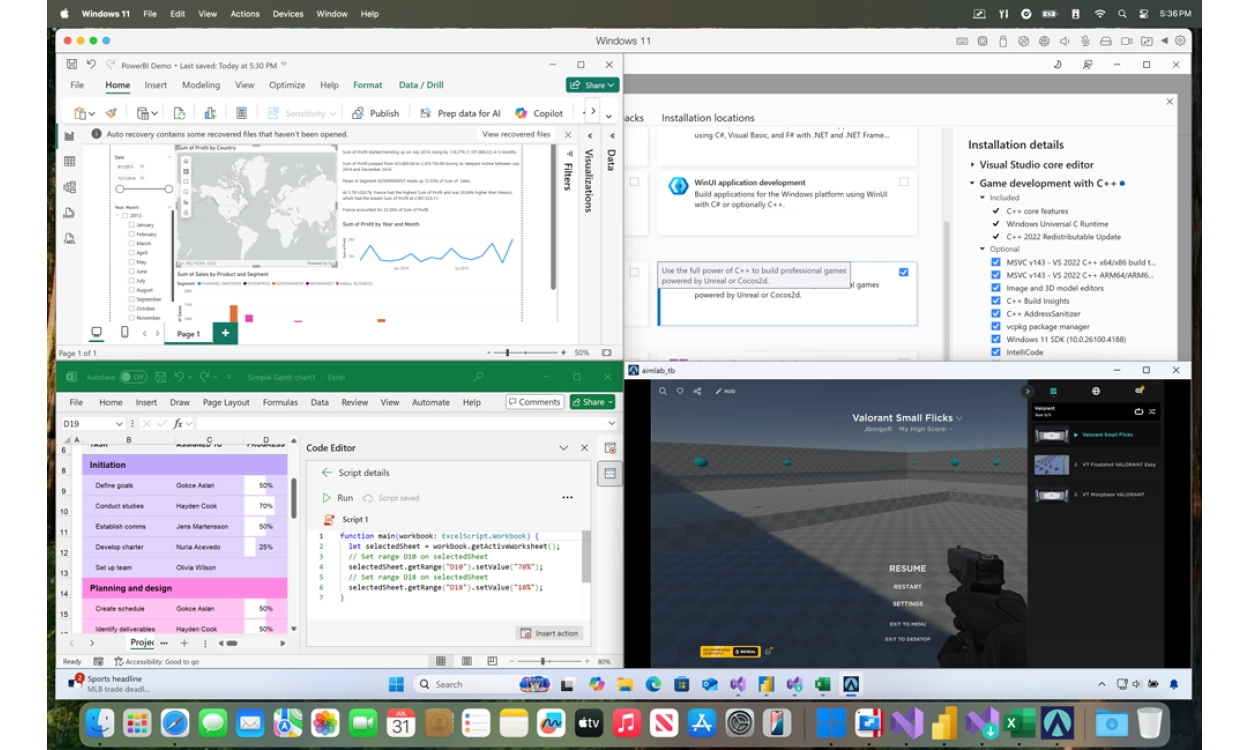
Parallels Desktop 26 Pro takes your Mac to the next level. Apple computers are powerful and stylish, but sometimes you need Windows apps that aren’t available for macOS. With Parallels Desktop 26 Pro, you can seamlessly run Windows 11, Linux, or older operating systems alongside macOS 26 “Tahoe”. No need to restart, with full integration of files, folders, and your desktop.
Parallels Desktop makes it happen. Fast, secure, and powerful!
The Pro Edition is designed for developers, designers, testers, engineers, and advanced users. With its powerful performance, you can run resource-intensive applications like AutoCAD, Visual Studio, and demanding Windows software without issues. Parallels Pro also provides extra features, such as managing VMs via the command line, working with linked clones, and using built-in development tools. Ideal for CI/CD workflows and testing environments.
You can also run multiple virtual machines simultaneously, enabling you to use different operating systems side by side. Whether you are testing software, working on web development, or using Linux distributions – Parallels Pro gives you maximum flexibility and performance. Additionally, you get premium 24/7 support, so you’re always covered when you need help.
Just like the Standard Edition, Parallels Pro supports all essential features such as Coherence Mode, DirectX/OpenGL 3D acceleration, and full compatibility with Windows, Linux, and macOS as virtual machines. Plus, you’ll receive the Parallels Toolbox with over 40 handy tools to simplify everyday tasks: quickly take screenshots, clean up your disk, or download videos with one click.
Installing Windows within Parallels
To install Windows within Parallels, you can choose Windows 11. The Windows 11 Home Retail and Windows 11 Pro Retail versions we offer are the most suitable for this purpose.
Go directly to the bundle offer for an exclusive discount!
Buying through 2GO Software means 100% genuine software, including installation guarantee, a clear manual, and personal support from our team of specialists whenever you need help.
Parallels Desktop 26 Pro - Now with new and improved features
Parallels Desktop 26 Pro combines the best of Windows and Mac. It is the most complete solution to run Windows, Linux, and even macOS environments on your Mac. This edition is specifically designed for developers, designers, testers, and power users. This year, numerous features have been updated and improved with extra focus on performance, compatibility, and productivity. Everything is built to offer you a stable, fast, and versatile working experience.
With the latest and improved features of Parallels Desktop 26 Pro, running Windows on your Mac is now easier and more powerful than ever. You can seamlessly switch between macOS and Windows without restarting. Share folders and files effortlessly, copy and paste images and text, or drag files between Mac and Windows applications. Thanks to improved performance, you’ll enjoy a smooth workflow even with demanding applications.
Parallels Desktop and Apple Silicon: the benefits
Improved performance
Parallels Desktop 26 Pro supports up to 128 GB of virtual RAM and 32 vCPUs per virtual machine. This means you can run even the most demanding applications with maximum speed and stability. Resource-intensive programs like AutoCAD, Visual Studio, or graphics-heavy 3D apps work seamlessly without interruptions.
Efficient virtualization
Run multiple virtual machines simultaneously and easily work with different operating systems side by side. Use a Windows environment for business software, Linux for testing, and macOS in a virtual machine—all at the same time. For developers, built-in tools are included, such as a command line interface and developer utilities, ideal for CI/CD workflows and automation.
Optimized Mac experience
Thanks to full support for macOS 26 “Tahoe”, you benefit from stable compatibility and ongoing updates. New system changes are automatically supported, so you can confidently use the latest macOS. Parallels Desktop is also Microsoft-certified and SOC 2 Type II-compliant, ensuring secure and reliable operation—even in professional and sensitive environments.
The updated and improved features of Parallels Desktop 26 Pro for Mac – Fast, reliable, and easy to use
Parallels Desktop 26 Pro is more efficient and powerful than ever. Here are some of the key improvements:
macOS 26 Tahoe Support
Fully optimized for macOS 26, with support for all new system features and compatibility updates.
Windows on Mac
- Take advantage of 128 GB vRAM and 32 vCPUs per virtual machine, perfect for heavy applications and demanding workflows.
- Run multiple virtual machines simultaneously, ideal for developers and testers who need various operating systems side by side.
- Use DirectX and OpenGL 3D acceleration to run graphics-intensive Windows apps and games smoothly.
Linux and developer tools
- Support for the latest Linux distributions and optimizations for Apple Silicon.
- Command line interface for managing and automating virtual machines.
- Built-in developer tools for CI/CD workflows and testing environments.
macOS as a virtual machine
- Run macOS itself in a VM for testing and development purposes.
- Use USB passthrough for better hardware integration in your macOS VMs.
Productivity & IT benefits
- Accurate disk space reporting in Windows VMs prevents crashes and ensures stable installations.
- Apple Intelligence integration for features like rewriting and summarizing in Word and Outlook.
- OBS Virtual Camera and Dragon Medical One integration make the Pro Edition ideal for both creative and professional workflows.
- Includes the Parallels Toolbox with over 40 handy tools for daily tasks.
FAQ
Loading...
Recommended combination
Loading...
Reviews (27)
Loading...
Product information
Loading...
- Money back guarantee
- Free installation service
- 100% legitimate licence keys
Do you want to know more or are you not quite sure what to pick? Call our software specialists for the best advice.
Call me back
- Description
- Frequently Asked Questions
- Recommended combination
- Product comparison
- Alternative products
- Reviews (27)
- Product information
Summarized
-
The solution to run Windows on your Mac!
-
Subscription duration: 1 year
-
Can be installed on 1 Mac
-
Suitable for Mac
-
Language selection: English, German, French, Spanish and Italian.
Buy Parallels at Licentie2GO
-
Up to 70% off during Black Friday
-
Always a free gift with selected software
-
10-star service for maximum digital security
